
Choosing a Bluetooth RTK GPS Receiver
By Antonio Liska • • Updated
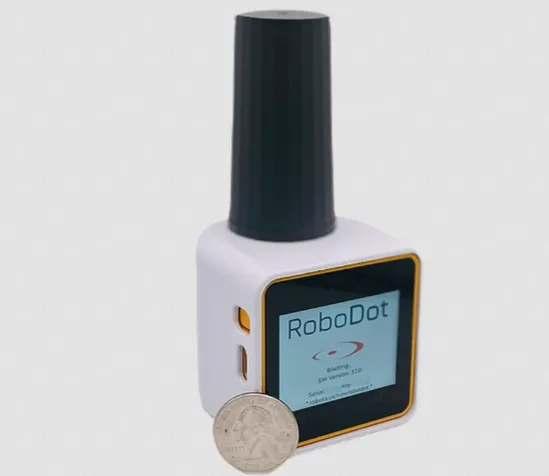
The right RTK receiver fits the equipment you already use and the work you need to finish. Start with your mapping app, correction source, and field routine. Then compare receivers.
Bluetooth is one part of that decision. It lets a compatible receiver send positions to your phone or tablet; the RTK measurements and corrections are what improve the position.
Start with your app
Write down your phone or tablet model, its operating system, and your mapping app. Check that exact combination against the receiver’s supported connections.
A Bluetooth label alone does not establish compatibility. Some workflows use Bluetooth, others use USB or a network connection, and an app may handle external positions differently on Android and iOS.
The RoboDot documentation covers supported field workflows. If your combination is unclear, ask before buying.
Decide where corrections will come from
An RTK rover needs suitable correction data as well as satellite signals. You can use a correction service or operate your own base station.
A service can save you the work of setting up a base at each site. Your own base gives you control of its location and operation, but adds hardware, setup, power, and a correction link to manage.
Compare RoboNet VRS plans if a subscription fits your work. If you already have a base, RoboGNSS can deliver its stream to your rovers over the internet.
Compare the complete field kit
| Check | Why it matters |
|---|---|
| App and connection support | Your positions must reach the software you use |
| Rover and base modes | You may need one receiver to do different jobs |
| Power and mounting | A desk demonstration is different from a day outdoors |
| Observation logging | You may need raw data for later processing |
| Correction link | Internet access and a radio link suit different sites |
| Support and setup guides | You need a clear route from delivery to useful work |
A receiver board can be a good starting point for a custom build. A finished receiver reduces the hardware you need to assemble and package. Compare the total kit and the time needed to put it to work.
Where RoboDot Touch fits
RoboDot Touch combines base, rover, logger, and repeater modes with a touch screen. It supports position output over Bluetooth LE, USB, and TCP for compatible workflows.
Choose the $1,675 version for a setup that does not need its optional radio, or the $1,875 version with the 915 MHz radio for RoboDot-to-RoboDot communication. Your correction subscription, accessories, and app requirements belong in the budget too.
It is a useful option when your work changes between measuring points, supplying corrections, and collecting observations. Confirm the connection path for each job rather than assuming every app uses the same one.
Work through your connection before choosing hardware
Use the path that matches your job:
| What you want to do | Connection to establish | What to confirm |
|---|---|---|
| Measure points with one receiver | Correction service → rover; rover positions → mapping app | Coverage, correction format, and support for your exact phone/app combination |
| Use two RoboDots without internet correction delivery | RoboDot base → optional 915 MHz radio → RoboDot rover | Radio-equipped units, compatible configuration, base setup, and conditions at the site |
| Share your base with internet-connected rovers | Base → NTRIP caster → each rover | Base upload, separate rover credentials, internet paths, and receiver compatibility |
| Collect observations for later processing | Receiver → raw observation log → RINEX workflow | The observation data your processing software requires and a successful sample conversion |
Treat these as setup choices, not a claim that every receiver or app works with every connection. The optional radio is specifically for RoboDot-to-RoboDot communication.
Before a first field job, check the complete path: the receiver gets corrections, reports its solution state, and delivers positions to the app that will save your points. A phone showing a Bluetooth connection confirms only that connection. It does not establish that the app is recording the external receiver’s position.
Send us your app name and version, phone or tablet model, receiver/controller model, and correction source. Those details let us discuss a specific setup instead of guessing from a Bluetooth label.
Check the result before you rely on it
A receiver’s accuracy claim is not a promise for every location. Obstructed sky, reflected signals, unsuitable corrections, or incorrect base coordinates can affect the result.
Confirm the receiver’s solution status and check your work against suitable control. A precise-looking number alone does not establish that a point is correct.
Bring us your field setup
Tell us what you measure and which phone, app, drone, or rover you use. We will help you work out whether RoboDot Touch fits and which connections you need.
Explore RoboDot Touch or ask about your setup.
Put centimeter accuracy to work
See the RoboDot Touch RTK receiver or talk to us about your surveying and mapping workflow.