
NTRIP vs. Traditional Base Station RTK: What’s the Difference?
By Antonio Liska • • Updated
When it comes to high-precision GPS in surveying, drone mapping, and GIS data collection, accuracy isn’t just a goal, it’s a requirement. Whether you’re mapping construction sites, reconstructing accident scenes, or monitoring agricultural land, the difference between centimeter-level precision and guesswork can mean the success or failure of your entire project.
At Robota, we’ve built our reputation on delivering reliable, accessible, and accurate geospatial tools like the RoboDot Touch RTK GNSS receiver and Eclipse 2.0 fixed-wing drone, technologies that empower professionals across industries to work faster, smarter, and with confidence. But even the most advanced hardware depends on how it receives correction data. And that brings us to one of the most important decisions surveyors and mappers face today: Should you use a traditional base station for RTK corrections, or go with an NTRIP-based solution?
Let’s break down the real-world differences between NTRIP (Networked Transport of RTCM via Internet Protocol) and traditional base station RTK setups and help you decide which option fits your workflow best.
What Is RTK and Why Does Correction Data Matter?
Before diving into NTRIP vs. base stations, let’s quickly cover the basics.
Real-Time Kinematic (RTK) positioning improves the accuracy of GNSS receivers by using correction data from a known reference point. Without corrections, standard GPS might get you within a few meters. With RTK, you achieve centimeter-level accuracy, a game-changer for professional applications.
This correction data can be delivered in two main ways:
- From a physically deployed base station (your own local reference point)
- Through a network of permanent base stations via internet connection (NTRIP)
Both methods have their strengths, but they serve different needs depending on your project scope, mobility, and budget.
How Does a Traditional Base Station Work for RTK?
A traditional RTK setup involves setting up your own base station at a known or arbitrary location. This base collects raw satellite data and sends correction signals to your rover (like the RoboDot Touch) over radio link.
Here’s how it typically works:
- You place the base receiver over a surveyed point or establish a temporary control point.
- The base calculates errors in the GNSS signal and broadcasts corrections.
- Your mobile unit (rover) applies these corrections in real time for precise positioning.
Advantages of a Traditional Base Station:
- Full control over setup: You choose where and when to deploy.
- No reliance on cellular networks: Works in remote areas without internet.
- High accuracy within short ranges: Best performance within 10 km of the base.
- One-time hardware cost: After purchase, no recurring fees.
Limitations to Consider:
- Limited range: Accuracy degrades with distance from the base station.
- Extra field labor: Requires setup, leveling, power management, and monitoring.
- Radio interference: UHF/VHF links can suffer from obstacles or noise.
- Single baseline dependency: If accuracy goes down, operations don’t stop
For teams working on isolated sites or in areas with poor connectivity, a traditional base station remains a solid choice. But if you’re operating across multiple locations or want to reduce field complexity, there’s a modern alternative.
What Is NTRIP and How Does It Enable RTK Over the Internet?
NTRIP stands for Networked Transport of RTCM via Internet Protocol. Instead of relying on your own base station, NTRIP connects your rover to a network of continuously operating reference stations (CORS) through the internet, usually via a cellular modem.
The process is simple:
- Your RTK receiver (e.g., RoboDot Touch) connects to an NTRIP caster using Wi-Fi or cellular data.
- The caster streams correction data from the nearest reference station(s).
- Your device applies corrections in real time, achieving high accuracy, often better than standalone base-rover setups.
This method is especially powerful when combined with VRS (Virtual Reference Station) technology, which models atmospheric errors across a region and generates a “virtual” base near your location for improved accuracy.
To access this service, you need an NTRIP subscription, sometimes referred to as a VRS subscription, depending on the provider and network type.
NTRIP vs. Base Station: Key Differences That Impact Your Workflow
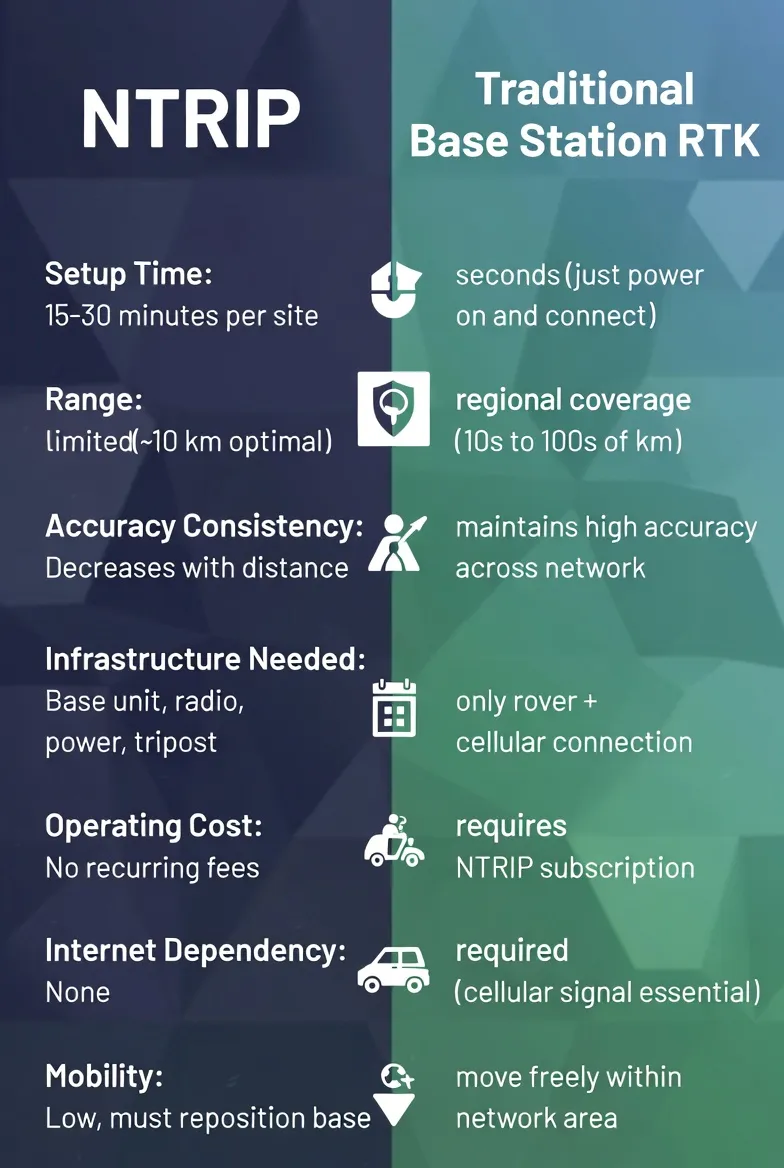
| Setup Time | 15–30 minutes per site | Seconds, just power on and connect |
|---|---|---|
| Range | Limited (~10 km optimal) | Regional coverage (10s to 100s of km) |
| Accuracy Consistency | Decreases with distance | Maintains high accuracy across network |
| Infrastructure Needed | Base unit, radio, power, tripod | Only rover + cellular connection |
| Operating Cost | No recurring fees | Requires NTRIP subscription |
| Internet Dependency | None | Required (cellular signal essential) |
| Mobility | Low, must reposition base | High, move freely within network area |
As you can see, the trade-offs are clear: control and independence versus convenience and scalability.
If you’re doing long-term projects in one location, or working off-grid, a physical base station makes sense. But if you’re a consultant traveling between job sites, a city planner managing multiple zones, or a drone operator covering large rural areas, NTRIP eliminates the hassle of carrying extra gear and setting up bases every day.
When Should You Use NTRIP Instead of a Base Station?
Not every situation calls for NTRIP, but here are the scenarios where it shines:
- You work across multiple sites daily No need to set up a base each time. Just turn on your RoboDot Touch, connect to your NTRIP subscription, and start collecting data.
- You operate beyond 10 km from a fixed base Atmospheric errors make long baselines unreliable. NTRIP networks account for these variations, offering consistent results across wide regions.
- You want to streamline drone surveying workflows Drones like the Eclipse 2.0 benefit greatly from NTRIP. With no need to transport and monitor a ground base, missions become faster and safer.
- You’re part of a team sharing GIS data Using a common correction network ensures all devices are aligned to the same datum and coordinate system, critical for collaboration.
- You value speed and simplicity Reduce field time, minimize equipment load, and eliminate radio pairing issues, all with a stable internet connection.
In fact, many state DOTs and regional survey authorities now operate public or private CORS networks that support NTRIP. By subscribing to these services or partnering with providers like Robota, you gain instant access to infrastructure that would be impossible to replicate on your own.
Do You Still Need a Base Station If You Have NTRIP?
Yes, in some cases.
While NTRIP offers incredible convenience, it’s not a complete replacement for all situations:
- No cellular coverage? Then NTRIP won’t work. A local base station with radio transmission is still your best bet.
- Working in sensitive environments? Some government or military sites restrict internet-connected devices.
- Need absolute control over coordinates? Establishing your own base allows you to tie into local benchmarks precisely.
That said, many professionals now use a hybrid approach:
- Use NTRIP for everyday tasks and rapid deployments.
- Fall back to a base station only when necessary.
With the RoboDot Touch, switching between modes is seamless. You can connect to an NTRIP caster in seconds or pair with a local base via Bluetooth or radio, giving you maximum flexibility in any environment.
How to Get Started with NTRIP and VRS Subscriptions
Ready to try NTRIP? Here’s what you’ll need:
- An NTRIP-compatible receiver: Like the RoboDot Touch, which supports both direct base connections and internet-based corrections.
- A cellular data plan: Ensure coverage in your operating area. Cell phone Hotspots or built-in modems work fine
- An active NTRIP subscription: This gives you access to a correction network. Options include: Public CORS networks (some free, others paid) Commercial providers (such as state-specific VRS networks) Private enterprise solutions
- Connection details: Caster address, port, mountpoint, username, and password provided by your service.
Robota supports integration with major NTRIP providers and offers guidance through our documentation portal to help you configure your device quickly.
Whether you call it an NTRIP subscription or a VRS subscription, the idea is the same: pay a monthly or annual fee to tap into a robust, professionally maintained network of reference stations, so you don’t have to build your own.
Final Thoughts: Choosing the Right Tool for the Job
There’s no single “best” way to do RTK. The right choice depends on your specific needs, environment, and workflow.
- Choose a traditional base station if you work remotely, require full autonomy, or have existing infrastructure.
- Go with NTRIP and a VRS subscription if you prioritize speed, mobility, and consistency across large or changing work zones.
At Robota, we believe in giving professionals the freedom to choose. That’s why tools like the RoboDot Touch are designed to excel in both worlds, delivering centimeter accuracy whether you’re connected to a nearby base or pulling corrections from a regional network.
Technology should simplify your work, not complicate it. And with the right combination of hardware and correction strategy, you can spend less time setting up and more time getting results.
Ready to Experience Seamless RTK Accuracy?
Stop wrestling with base stations and radio links. See how easy high-precision surveying can be with the RoboDot Touch and an NTRIP subscription.
Visit our shop to explore compatible configurations and find the right setup for your team. Precision shouldn’t come at the cost of convenience. Let Robota help you work smarter, move faster, and map with confidence, anywhere, anytime.
Either way you go, one receiver covers it: see RTK base station setup or RoboNet VRS plans.
Put centimeter accuracy to work
See the RoboDot Touch RTK receiver or talk to us about your surveying and mapping workflow.